You send the same partitions package out to three subcontractors. One comes back with a single lump sum. One itemises everything but excludes the head and base track. One prices it cleanly but has quietly assumed a different ceiling height. Three numbers land in your inbox, and the lowest one is not necessarily the cheapest — it might just be the one that left the most out.
This is the everyday reality of buying subcontract packages, and the spreadsheet most teams use to compare them actively hides the problem. You line up three totals in three columns, the bottom row picks a winner, and the differences that actually matter — what each price includes — are buried in PDFs nobody reads side by side.
A headline total tells you almost nothing
The trouble with comparing lump sums is that you are comparing answers without seeing the working. A £48,000 bid and a £52,000 bid look like a £4,000 decision. But if the cheaper one has excluded fire-stopping, assumed a lower spec on the acoustic infill, or left out two rooms entirely, you are not saving £4,000 — you are deferring a cost that will reappear as a variation, a delay, or an argument on site three months later.
The decision you actually want to make is not "whose total is lowest" but "for each line of work, who is the right price" — and then award the package knowing exactly what you have bought and what you have not. That is impossible to do confidently when every bid is a different shape.
Put every bid in its own column and compare line by line
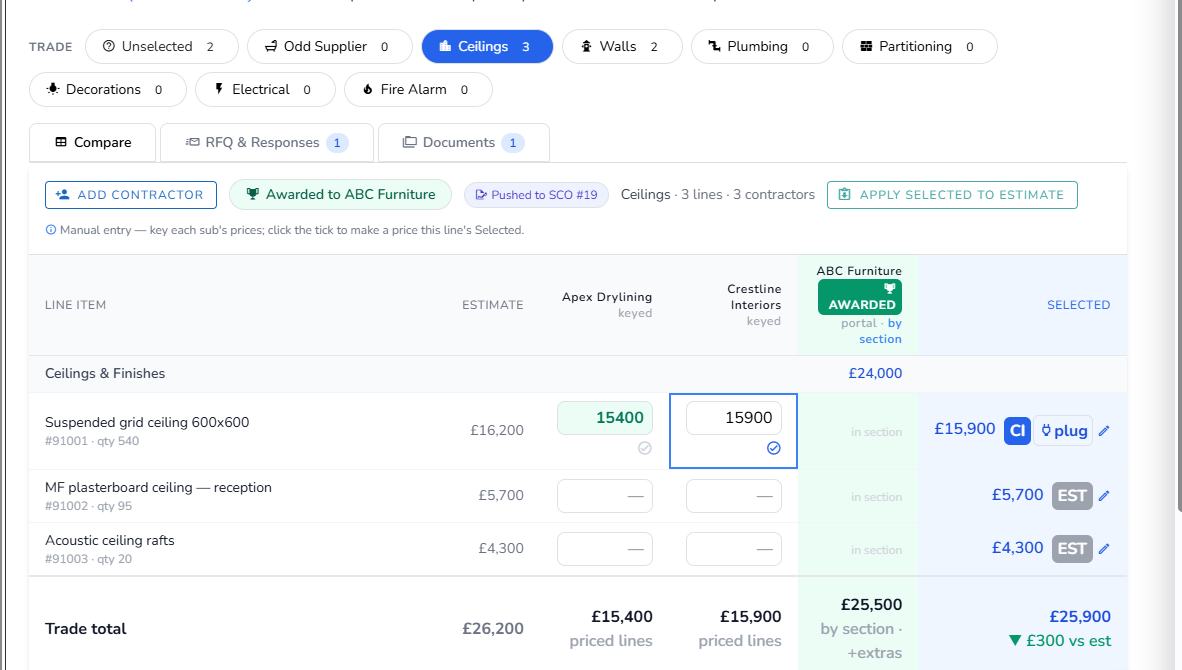
The Vyntworks tender board is built to do exactly this. You open a board straight from a quote or a project — starting the tender from the line actions, so the package carries the lines you actually priced — and group the work into trade packages. You send RFQs to your shortlisted subcontractors through a portal link and record their returns, and each subcontractor's prices sit in their own column against the same set of lines.
Now the comparison is honest. On the Compare tab you read across the board line by line: this bidder is sharpest on the glazed screens, that one on the doors, a third on the ironmongery. Instead of being forced to take one bid whole, you select the best price per item — and those selections are held separately from your estimate, so exploring the combinations costs you nothing and changes nothing until you decide to commit.
Because every bidder is priced against the same line structure, the gaps reveal themselves. A blank where a price should be is an exclusion you can see, not one you discover later. The bid that looked cheapest on the headline often stops looking cheapest the moment you can read what each one actually covers.
Award once, and the order writes itself
Picking the winner is where a spreadsheet comparison usually ends and the re-keying begins — someone retypes the chosen prices into a purchase order and hopes nothing drifts. On the tender board, awarding a package is the start of that step, not a fresh round of data entry. You award the trade, then push the winner straight to a Subcontract Order and/or a Purchase Order — one order per trade, with group and lump items apportioned pro-rata — anchored to the lines you tendered.
If a subcontractor's bid came with an add-on — an extra they have included that wasn't in your scope — it resolves cleanly, either merging into the relevant line or being raised as a variation, so it lands on the record rather than getting lost in an email thread.
And when the buy prices you have just secured are sharper (or dearer) than the rates you estimated, you can apply the selected prices back to the estimate. Vyntworks recomputes the sell figure from your gross-margin target, the move is audited, and it is undoable — so the number you are now committing to buy at, and the number you are selling at, stay in step instead of quietly parting ways.
Buy what you meant to buy
The whole point of tendering a package is to get a competitive price with full sight of what that price covers. Comparing lump sums gives you the first half and hides the second. Comparing line by line, in columns against a single set of lines, gives you both — so the package you award is the one you actually understood, not the one that happened to show the smallest total.
If your team still compares subcontract bids by flipping between PDFs, book a walkthrough and we'll set a tender board up on one of your own packages, so you can watch three apples-to-oranges quotes turn into a like-for-like decision.