Everything between the enquiry and the final account.
One system for the commercial life of a project — and the governed substrate your AI workforce runs on. Every module shares one model, so your numbers stay consistent from tender to reconciliation; every AI draft waits for a human decision, and every action lands on the record.
Tap any feature below to see how it works.
Estimate
Quote editor, takeoff and fast quotes get accurate prices out the door fast — AI Edit drafts, your estimator approves.
Win
Convert a won quote to a live project — structure, budget and authoriser carry across, nothing re-keyed.
Deliver
Procure with POs, SCOs and competitive tendering; control change with variations that route through approval.
Final account
Value the work, invoice in phases, and reconcile cost against value, live — one auditable record end to end.
The tender pack lands. The reading starts itself.
Every job starts as somebody else's pile of PDFs — drawings, a spec, a schedule, a covering email. The Plan Room is the intake bench where that pack becomes a checked, measured brief before it ever turns into a quote. Drop the whole pack in; your AI colleagues read every document and take the measurements off the drawings; a person clears anything that needs judgement; then one gate promotes it into a Vyntworks estimate.
Drop the whole pack in — get back a checked, measured brief
Open a project on the right desk, drop the tender or survey pack in one go, and Mandate hands it to your AI colleagues as a two-stage pass. The work is pooled — the first free colleague picks it up — and nothing about it is a black box.
- A document register that classes itself — every file classed, sheeted and page-counted on the way in, with drawing filenames linking straight into the take-off viewer
- The mandate one-two — Stage 1 reads every non-drawing document, raising findings and enriching the brief; Stage 2 takes the geometry off the drawings — both automatic, one after the other
- A numbered measurement brief the readings write back to — line by line, with provenance on each and a re-run you can dispatch on any single line
- Watch it live, and talk to the colleague on the job — a slide-in Live pane shows the work as it happens, so a long read is something you can see, not something you wait on
Set the method once, per kind of work
A desk captures how one recurring kind of job should be read, so every pack opened on it starts the same way. Your standard brief, the reference files that should always be to hand, and the crew who work it — configured once, applied to every project.
- A standard brief of “things to look for” — what you want, what you explicitly don't, the visual clues and the pricing note on each — the method that drives every reading, no playbook required
- Standard files & links every project inherits — a current price list, a spec, a reference drawing — always to hand for the reading
- The desk crew — the group of AI colleagues who pick up this desk's projects — set once and pooled across the work
- Optional Direct mode — give a desk its own Microsoft 365 mailbox, so a pack emailed in opens itself as a project. Desks are admin-managed; Duplicate spins a variant for a new sector in a click
Nothing lands until a person clears it — then one gate mints the quote
The machine does the reading; the judgement stays human. Everything that needs a decision collects in one place across the whole room — the calls only a person should make — and only a verified pack can be promoted into a quote.
- One review queue for the whole room — adjudications, open findings and flagged brief lines together, each row deep-linking to the exact spot of the project that needs you
- Clear it on the bench, on the record — accept, dismiss or reopen each finding, decide every adjudication, and sign off the flagged lines — the human sign-off Vyntworks is built around
- When there's nothing left, it says so — an empty queue reads “Nothing needs you. The machine is running.” — so you know the reading is done, not just quiet
- Promote is the gate — it mints the quote from the verified pack and the job leaves the queue. From there it's a normal Vyntworks estimate — same editor, same review-first discipline
The Plan Room reads and measures; you decide and promote. It runs on your Digital Workforce and is part of the Vyntworks Intelligence add-on — the same governance, one step earlier in the job.
Price more work, in less time
This is where Vyntworks' AI does its first job — drafting structures and changes inside the Quote Editor — and where your estimators stay firmly in charge of the number. Nothing prices itself; everything is reviewed.
The Quote Editor
A fast, hierarchical estimator with full keyboard control, instant GP adjustment — and AI Edit working under review inside it.
Learn more →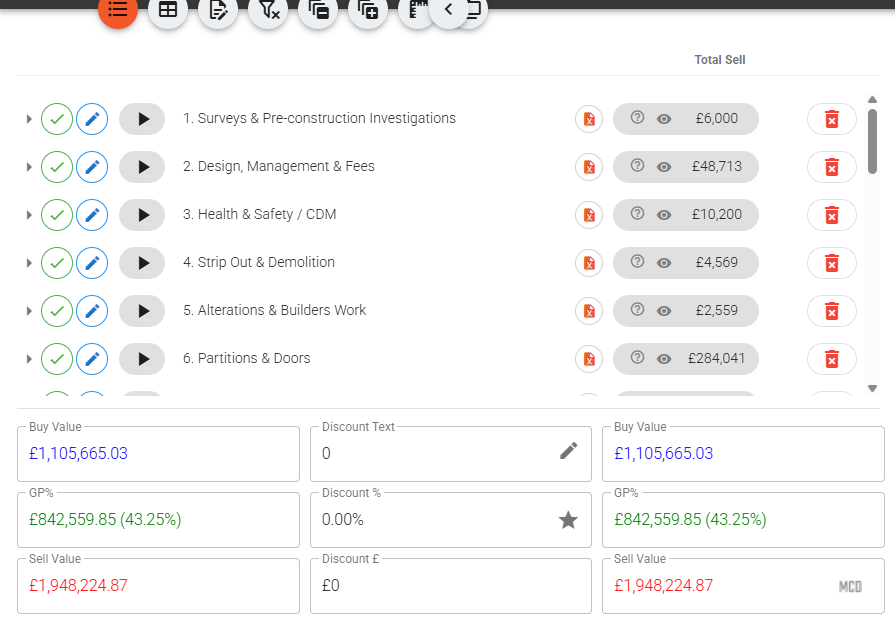
Build estimates as a tree of sections, line items and sub-items. Select any line (or several) and adjust GP while the sell price recalculates live — GP% = (Sell − Buy) / Sell. AI Edit drafts changes right here; nothing applies until you approve it.
- Keyboard-driven: Alt+A adds a line, Alt+S a sub-item, Alt+arrows move & nest
- Multi-select to copy, paste, highlight or delete whole branches
- Four item statuses — Included, Excluded, No Money, Below The Line
- Flag items for reviewer attention without affecting price
Numbering, versioning & revisions
One set of rules numbers your quotes, versions every revision and names the documents — so there's always one quote that's live.
Learn more →Set the rules once and every new quote auto-fills its reference, name, version label and download file name. Each quote then keeps a revision tree — start a new revision, set any one live, or compare two and read the sell delta. Existing quotes are never touched; the rules only apply to new work. It's the same discipline the AI works under: history kept, nothing overwritten.
- Auto reference, name, version & download file-name rules
- Describe the rules in plain English, or set them by hand
- A revision tree per quote — New revision, Set live, Compare
- Version labels as A, B, C, as 1, 2, 3 or in Roman numerals
Presentation Mode
Show a client your screen without revealing a single margin.
Learn more →One click hides every commercial figure — buy values, GP%, adjust-GP controls, cost breakdowns and the discount box — while item names, descriptions, sell prices, quantities and the total stay on screen.
- Toggle from the toolbar eye icon or the hamburger → Display menu
- Optionally reveal the discount and pre/post totals to the client
- Display-only — nothing is saved or changed
Takeoff
An AI estimator reads your PDF drawings and drafts the takeoff — measured from the drawing's own geometry, evidence attached, linked to your quote lines.
Learn more →Hand Vyntworks the drawings and it reads the pack the way an estimator would: title blocks and revisions first, then each sheet calibrated from its own printed dimensions, then rooms, wall runs and repeated symbols measured from the PDF's vector linework and checked against the areas printed on the sheet. What comes back is a proposed takeoff with marked-up evidence for you to approve. Measure by hand too — Linear, Area and Count into named groups — and link any quote line's quantity to a measurement, a group total or an analysis. Change the takeoff and a drift badge flags every line that needs review; nothing changes silently. Drawings carry through to the project as job documents.
- AI reads the pack, calibrates each sheet and drafts the takeoff — you approve
- Measured from the PDF's vector geometry, reconciled to the sheet's own figures
- Ask for a schedule in plain English — doors, partitions, floor areas — typed in the legend's own words
- Link a line's quantity to a measurement, group Σ or analysis; a drift badge flags every change
Basic takeoff is on every plan. The AI estimator, named groups, analyses and drift-linked quantities above are the Takeoff & Drawings add-on — £300/mo on Pro, a flat company-wide fee not per user, included in Enterprise (ex VAT). See plans & pricing →
Fast Quotes
Template-driven quoting that switches whole systems on and off — your pricing method, written down and repeatable.
Learn more →Author your pricing model in Excel with the Vyntworks add-in, then pick a template, turn on the systems you need, and Vyntworks calculates transport & access, attendance and programme times for you. Output is a polished Excel quote — built from your method, not an improvisation.
- Templates authored in Excel via the Vyntworks add-in, kept versioned
- Or describe a job in plain English and AI drafts the whole template — you review before it goes live
- Systems off by default — enable only what applies
- Auto-calculated transport, attendance & programme times
- Print by level and exclude £0 lines on export
Products & Price Tables
A reusable cost library, rate cards and base costs — the priced knowledge everything quotes from.
Learn more →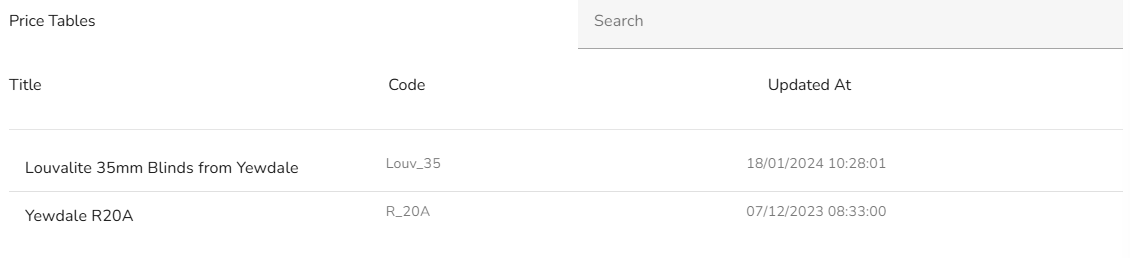
Keep your items and costs in one library by category, attach client- or job-type rate cards, and build line costs on underlying base rates — so the right pricing applies every time, whether a person or the AI is drafting.
- Products library pulled into quotes and fast quotes
- Price Tables — rate cards attachable per quote
- Base Costs underpin line-item pricing
Spec Library
Reusable rich-text specification blocks you drop into any line.
Learn more →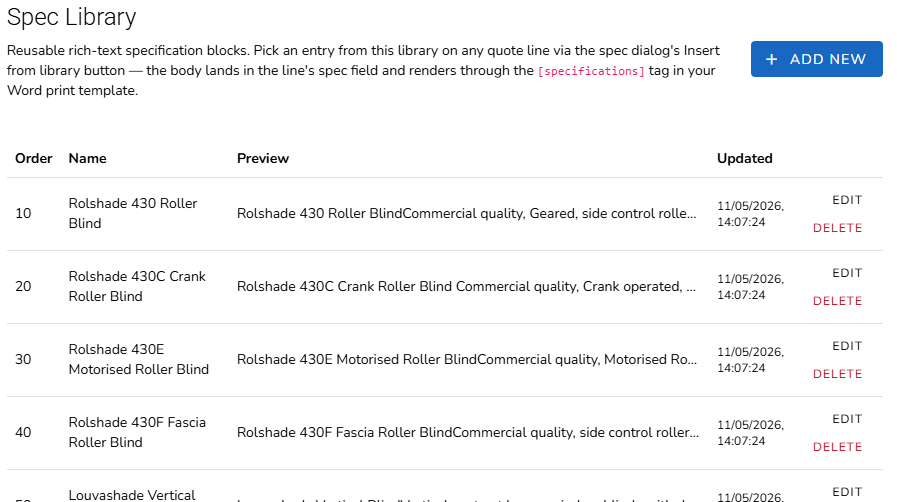
Maintain a library of standard specification text and insert it into a line's spec with a picker. It renders into your branded Word output via the [specifications] tag — approved wording, used everywhere it should be.
- Insert standard specs from a picker
- Rich-text blocks managed in Settings → Spec Library
- Flows into the Word quote template automatically
Default Quote Items
Start every new quote from your standard set of lines — so nothing routine gets missed.
Learn more →Configure a Default Quote Items template and new quotes can auto-populate with your standard lines, keeping every estimate consistent and complete from the first click. Set it once in Settings → Default Quote Items.
- Auto-populate new quotes from a saved template
- Keep your standard lines consistent across estimators
- Managed in Settings → Default Quote Items
Cost Category Templates
Import a supplier's spreadsheet as priced lines — and let your job overheads spread themselves across every one.
Learn more →Map a supplier or manufacturer workbook once — name, buy, sell, quantity, unit, section, part number — and import it straight into a quote as structured, priced lines. Then define the costs that aren't on that sheet (labour, travel, survey, delivery) as reusable cost categories, and Vyntworks apportions them across the imported items so every line carries its true share. Set up in Settings → Cost Category Templates.
- Column mapping saved per template — preview the import before you commit
- Cost categories priced as % of sell, % of buy, a fixed pot or per unit
- Apportion by value, by quantity or by your own allocation column (e.g. m²)
- Declare your own per-item fields — width, drop, fabric — that print in your Word quote
Bring your spreadsheet estimates in — no re-keying
You already price work in spreadsheets your estimators trust. Map that workbook's shape once as a template, then Import Spreadsheet pulls any matching sheet straight into a quote as structured, priced lines — with a preview before it commits and a restore point taken first. Moving to Vyntworks doesn't mean re-typing a single estimate.
One click in the Quote Editor — the button and the AI run the same importer
Set the column mapping once in Settings → Cost Category Templates — name, buy, sell, quantity, unit, section, part number. From then on, the Import Spreadsheet button reads any workbook in that shape and splices its rows (and section headers) into your quote, exactly where you want them.
- Preview before you commit — a dry run lists the rows, sections and totals it will add, and flags any layout warnings, so nothing lands on your quote unseen
- A restore point is taken first — every import saves a labelled snapshot of the quote before it writes, so you can roll straight back if it isn't what you meant
- Import as a section — or as children of a line you pick, so a supplier schedule slots under the right heading instead of at the bottom
- Your overheads apportion themselves — the template's labour, travel and delivery cost categories spread across exactly the lines you just imported, so every one carries its true share
- Or just ask Ask Vynt — attach the sheet in chat and the in-app assistant runs the very same import, previews it, and waits for your go-ahead. Review-first, like everything else
The same parser powers the button and the assistant — so a preview always matches what lands, however you choose to import.
Never lose track of which quote is live
When a client asks for changes, revise — don't overwrite. Vyntworks versions every quote, keeps one marked live, and shows you line-by-line what changed between any two — with the sell delta in black and white.
One quote is live — and every earlier number is still there
A new revision clones the live one and advances the label, so the original is never lost. Set any revision live and the whole team — human and AI — reads from the same authoritative version.
- New revision clones the live quote and advances the version — Rev A → B → C — leaving the original intact
- Set live marks one revision authoritative; the Quotes list shows which one at a glance
- Compare any two revisions for added, removed & changed lines and the sell delta
- References, names, version labels & download file names auto-fill from rules you set once — described in plain English or set by hand
- Existing quotes are never touched — conventions apply only to new work
- Watch the margin across revisions — the GP Tracker report follows every quote's GP% from Rev A to the live one and puts the ones giving margin away at the top. See it on Cost control →
No more final-FINAL-v3.xlsx — the live quote is obvious, and every earlier number is still there to explain how you got here.
Every quote you've sent — grouped by client, found in seconds
Quotes opens your whole quote book, grouped by client — every job that client's been quoted under one row, a count beside their name, and the live revision obvious at a glance. No more hunting a shared drive for the version you actually sent.
- One row per client, A→Z — expand a client to read their jobs with Buy, Sell and GP% side by side; anything not yet linked sits under Unassigned, so nothing hides
- Search that actually finds it — type to filter across quote name, version and reference, narrowing both the client groups and the quotes inside them
- Act without leaving the list — open a quote in the editor or as a Fast Quote, toggle which revision is live, jump to its revisions, or straight to its Tender Board
- Current and Archived, one click apart — archive a finished job, or a whole selection, to tidy the list and restore it whenever; archiving is never deleting
- Filter to one team & export the book — narrow to a single team's quotes when Teams is on, then export every quote to Excel, or just the ones flagged live
One register for the whole book — so the answer to “where's that quote from March?” is a search, not an afternoon.
Build your pricing model in Excel — quote from it in minutes
Systemised, repeatable pricing lives in a spreadsheet your estimators already trust. Fast Quotes lets you author that model in Excel with the Vyntworks add-in, then run it as a guided quoter — pick a template, switch on the systems you need, and a polished Excel quote comes out the other end. Your method, encoded and versioned, so every quote prices the way your best estimator does.
Author the template where the pricing already lives
No re-keying your logic into a foreign tool. Install the Vyntworks Excel add-in, build the template inside Excel, and it becomes a live Fast Quote template — versioned and ready to use.
- Download the Excel add-in from Settings → Templates → Fast Quote Templates, and create new templates from inside Excel — not by uploading a file you hope maps correctly
- Systems off by default — un-exclude only the ones a job needs; each exposes its own options for Transport & Access (incl. supply-only), Attendance and Programme times
- The maths is calculated for you — transport & access, attendances and programme times auto-compute as you toggle, and stay adjustable line by line
- Polished Excel out — print by level (room-by-room or floor-by-floor), show optional-item totals and drop £0 lines, down to the level of detail you choose
A versioned template library — never a folder full of pricing-v7-FINAL.xlsx
Every template keeps its history in one place, so you can evolve your pricing without losing what won you the last job.
- Versions grouped under one name — the latest shows as Newest; expand the row to reach every earlier version you've published
- See what's actually in use — a Quotes count on each version tells you how many quotes were built from it before you retire or change it
- Drag to reorder — the order here is the order estimators see in the start-screen dropdown, so the templates you reach for sit on top
- Download, Rename, Duplicate or Delete per row — duplicate one to spin up a new template from a proven base, all without leaving Vyntworks
Or don't start in Excel at all — describe it, and AI drafts the model
Fast Quote Auto turns a plain-English brief into a complete Fast Quote template. Describe the pricing job — drop in a spec, price list or an old quote if you have one — and it drafts the questions your estimator will be asked, the products those answers price, and the Excel formulas that tie the two together. You review and edit every part before it becomes a live, versioned template.
- From a brief, not a blank sheet — describe the job, optionally attach a document, and the AI drafts the questions, products and formulas in one pass you can watch step through
- Every question, the estimator's way — dropdowns, tick-boxes, numeric inputs and repeat-per-room groups, each with show-if rules, help notes and sensible defaults, all editable in a live preview
- Answers that drive the price — each product carries a formula that reads the answers, so “3 posts” or “a 6 m run” prices the line itself; products nest, and calculated fields hold the shared maths
- You review before it's live — nothing saves itself; edit the draft, save it as a new version, and it joins your template library ready to quote from. Admin-controlled under Settings
Fast Quotes is part of Vyntworks estimating — no extra module required. Fast Quote Auto uses AI, metered in £ like every AI action.
Price it once. Reuse it on every quote.
Your rates shouldn't live in one estimator's head, or in a workbook only they can find. Products, Price Tables and Base Costs hold your priced knowledge in one place — the same source every quote is built from, whether a person or the AI is drafting it.
Your catalogue, held once — dropped into any quote
Keep your items and rates in one library, organised by a Group 1 / 2 / 3 category path with a description, price, GP and quantity on each. When an estimator — or an AI colleague — prices a line, they pull straight from the library, so the same rate applies every time and nobody prices from memory.
- Organised by a Group 1 / 2 / 3 category path, searchable, with a Current / Archived toggle so retired rates leave the pickers without being deleted
- Sub-items build an assembly — a made-up item priced from its parts, not guessed at as a lump
- A product image travels with the item — upload it once and it carries onto the quote line and can appear on its print-out, so the client sees what they're buying
- Choose your columns — show or hide the code, nominal and supplier fields; they earn their place when products sync to your accounting package
- Populate in bulk by syncing your accounting package's product list (e.g. Sage 50), bringing the supplier and nominal codes across too
Change a rate once — every quote that uses it re-prices
Price Tables are lookup grids — rate cards a line's price formula reads by name, row and column, so a rate that varies (a sqm price by specification or panel size, say) is looked up, never re-typed. Base Costs hold the underlying supplier rates your product prices are built on. Update the table or the base cost and every quote that references it moves with you.
- Rate cards, referenced by formula — each table has a code name, and a line formula pulls the right cell by row and column, so the number is always the current one
- Edit inline, saved as you go — change a cell in the grid and it commits on the spot; the next quote to open prices from it
- Base Costs underpin your products — supplier rates in one list, with each product's price built on top, so a supplier reprice flows through
- One source of truth for people and AI — whoever drafts the quote, the rate comes from the same table
Products, Price Tables and Base Costs are part of Vyntworks estimating — no extra module required. Your priced knowledge lives in one place, and stays there when someone leaves.
The arithmetic behind the quote — as a spreadsheet you own
Behind the price list sits the working-out: length × projection is an area, posts become install days, a rate becomes a line. Most estimators keep that in a private Excel file nobody else can open. A Vyntworks Sheet brings it inside the quote — a real spreadsheet whose cells write the quote's own lines, versioned like everything else, so the method that prices a job is on the record, not in one person's laptop.
Design the sheet once — every quote runs its own numbers through it
In Settings → Sheets you lay out the calculation like a spreadsheet — one column per section of the quote. Some cells are typed on each job (the posts, the projection, the rates); others are formulas over them. Each quote then carries its own values, while the formulas, links and layout come from the sheet.
- Typed cells and formula cells, side by side — an Excel-style grid with tabs, number formats and per-section columns, so the sheet reads the way your estimators already think
- Write formulas in plain English — “one day per post plus three, at least one” becomes = max(1, posts + 3); drafted by AI for you to check, or typed by hand
- A cell writes a quote line — its figure becomes the quantity or buy of the matched line, bound by unit and tag rather than by name, so the estimate re-prices from the sheet, never re-keyed
- Hidden helper cells compute in the background — the intermediate maths is there when a formula needs it, without cluttering the numbers you show
Your Excel goes in and comes back — and every version is kept
Nobody has to rebuild a pricing sheet they already trust. Import an Excel workbook and its formulas, names and number formats come in as they are; export it back and it round-trips losslessly. And because a Sheet is versioned, the way you priced a job last year is never quietly rewritten.
- Import .xlsx, .xls, .ods or .csv — formulas kept verbatim, number formats mapped, names carried across, so your existing sheet becomes a Vyntworks sheet without re-keying a cell
- Export back to Excel, losslessly — a hidden metadata sheet preserves the line links and the per-section layout, so export → import returns the very same working sheet
- Every save is a new, immutable version — old ones never change, a quote records the version it priced on, and you can diff any two row by row
- Disagreements are surfaced, not silently applied — when a linked cell and the line it drives part company, it’s logged for a person to settle — the same review-first discipline as the rest of Vyntworks
Sheets are part of Vyntworks estimating — no extra module required. Writing a formula from plain English uses AI, metered in £ like every AI action; typing it by hand doesn’t. It’s the same idea as your pricing library — priced knowledge kept where the whole team, and the AI, can read it.
The supplier sends a spreadsheet. You send a priced quote.
Half the estimate arrives as somebody else's workbook — a schedule of products with a buy price against each line. The other half is the cost that isn't on that sheet: labour, travel, survey, delivery. Cost Category Templates import the first and spread the second, so every line carries its true share of the job — instead of a lump sum bolted on the bottom and a margin nobody can defend.
Map the columns once — then it's an import, not an evening
Tell Vyntworks where the name, buy, sell, quantity, unit, section and part number live in that supplier's layout, and save it as a template. Every workbook that arrives in the same shape imports the same way — from the quote, either as top-level lines or as children of the item you picked.
- One mapping per supplier layout — set the start row, point each field at a column, and it's reusable for every job that follows
- Preview before you commit — run a test file through the mapping and read back the rows it found, so you fix the mapping in Settings, not in a live quote
- Formulas resolved on the way in — the workbook's own calculations are read, not the raw formula text
- Your own per-item fields — declare width drop fabric and they're captured per line and become placeholders in your branded Word quote
- A Section column groups the import into areas automatically — no dragging hundreds of lines into place
The costs that aren't on the supplier's sheet — recovered on every line
Define labour, travel, survey or delivery once as reusable cost categories. On import, Vyntworks distributes each of them across the imported items, so a line's sell price reflects what that line actually costs you to deliver — and the client sees a rate, not a mysterious lump at the bottom.
- Priced how you price it — a percentage of sell, a percentage of buy, a fixed pot, a per-unit rate, or a margin-only line that carries no cost
- Split how it really behaves — apportion by item value, by quantity, or by your own allocation column such as m²
- Per quote or per section — a job-wide overhead sits at the top; an area-specific one sits inside each section and only spreads across its own siblings
- Job-specific numbers straight from the workbook — read a category's value from a named cell, or a whole per-section summary grid, so this job's labour figure comes from this job's sheet
- A default GP% fills the gap when a supplier gives you cost but no sell — with a per-line override when one product carries a different margin
Every apportioned cost lands as a visible line in the quote tree, so an estimator can see exactly where a number came from — and change it. Part of Vyntworks estimating; no extra module required.
Hand it the drawings. It does the takeoff. You approve every figure.
Vyntworks puts an AI estimator on the PDF drawings you're issued. It reads the pack the way you would — title blocks, drawing index, revisions — sets each sheet's scale from its own printed dimensions, and measures rooms, wall runs and repeated symbols from the drawing's actual vector geometry, checking its figures against the areas printed on the sheet. What comes back is a proposed takeoff with the evidence to check it. Approve it and the quantities link to your quote lines, so when a drawing is re-issued Vyntworks tells you exactly which lines have drifted. Nothing updates itself behind your back; the decision is yours.
Basic takeoff is on every plan — calibrate a page, measure by hand, pull the figures into a quote. This module is for teams doing serious measurement: the AI estimator that reads the pack and drafts the takeoff, plus the named groups, analyses, pitch reading and drift-linked quantities below.
From the drawing to the line, without re-keying
Whether the AI measured it or you did, the takeoff lives inside the quote. Open Takeoff from the quote, measure into named groups by hand where you want to, and pin your line quantities to what was measured — with a waste factor if you need one.
- Per-page calibration, then Linear, Area and Count tools measured into colour-coded groups
- Combine measurements with analyses — points-in-area, length-in-area or area overlap
- Link a line's quantity to a measurement, a group Σ total, an analysis, or several across drawings — each with its own factor for waste or laps — no double-entry
- A drift badge flags when the takeoff changed, or a quantity was edited away from its link — review, update or unlink per line
- Drawings carry through to the won project as job documents
Set the scale from the sheet's own dimensions — metric or imperial
Calibrating a page usually means hunting for a scale bar, or tracing a length you already know. Point Vyntworks at the drawing instead and it reads the dimension figures printed on the sheet, works out the page scale from them, and proposes it — you glance at the candidate and confirm. Nothing is set until you do.
- Reads the printed dimensions — it finds the dimension strings on the sheet and pairs them against the linework to work out pixels-per-metre, so the scale comes from the drawing's own figures, not an eyeballed guess
- Metric or imperial — it reads feet-and-inches with fractions (8′-4 1/4″), curly marks and dimensions a CAD package has split across the line, and calibrates in feet where the sheet is imperial
- Proposed, then confirmed by you — the candidate scale waits for your nod, the same review-first gate as everywhere else; adjust it, or trace a known length by hand, if you'd rather
- Then every measurement reads true — with the page calibrated, your Linear, Area and Count figures are right first time and drift-link to your quote lines as before
Some quantities are an angle, not a length — read the pitch off the drawing
A roof slope, a stair flight, a ramp gradient — the figure that decides a fitting or a detail is a pitch, and scaling it off by eye is where a takeoff goes wrong. Vyntworks reads the angle straight from the drawing's own vector linework and reports it in degrees, so the pitch on your quote is measured, not guessed.
- Straight from the linework — draw a box round the run and it builds an ink-weighted picture of the directions inside, then reports the dominant pitch — the geometry the PDF already carries, read directly rather than traced by hand
- No calibration needed — an angle is scale-invariant, so a pitch reads true whether or not the page scale is set; border lines and dimension strings are held back so they can’t drown out the reading
- Confirm a figured pitch, or surface one — check the sheet’s own callout (a 28° stair, a 1:12 ramp) against the linework, or let it report the pitches actually present on the drawing for you to pick from
- Plan turns caught too — a landing that turns through 90° reads as a quarter-turn, so a run that changes direction is measured, not flattened into one line
- Proposed, then yours — like every measurement, the read is put in front of you to confirm; nothing lands on the takeoff until you accept it
Angle & pitch reading is part of the Takeoff & Drawings add-on, alongside the measure tools above — the geometry read straight off the sheet, the decision still yours. See plans & pricing →
Two ways to measure — by hand, or read off the drawings for you and approved.
Or let the AI estimator do the takeoff — you approve every figure
Point Vyntworks at a drawing pack and it does what a good estimator does on day one: reads every sheet, works out what it's looking at, calibrates it, and measures. Rooms come back with their exact outlines, wall runs with their lengths, repeated symbols with their counts — each typed in the drawing's own legend wording — as a proposed takeoff, page by page with a confidence flag on each, for you to review, adjust and approve. Nothing is committed until you say so.
- Reads the pack first — title blocks, sheet numbers, declared scales and the drawing index, grouping revisions and measuring each element once from the authoritative sheet, not twice because a site plan repeats it
- Calibrates itself — on CAD PDFs it reads the dimension strings, the declared scale and the true paper size, cross-checks them, and tells you how many dimensions agreed
- Finds every labelled room — matches each printed area label to the exact closed outline on the plan and checks the computed area against the printed one, splitting out balconies and terraces
- Reads the legend — wall types, symbols and fittings are counted and measured under the sheet's own key, tagged with the room they sit in
- Proposed, never silent — every page scored red / amber / green; measurements land only when you approve them, then flow onto your quote lines drift-linked
How it proves each figure — before you trust one
A plan-reader is only worth having if it's honest about what it can't see. Vyntworks grounds every measurement in the drawing's own geometry, checks its own counts twice, reconciles areas against the figures printed on the sheet — and when it still can't be sure, it hands that one back for a person rather than quietly guessing.
- Vector geometry first, vision only where it must — where the PDF carries real linework, that's what's measured; AI vision reads image-only pages, and those come back flagged lower-confidence for you to re-check
- Counts are grounded, then confirmed — repeated symbols are counted from the CAD data itself, their identity confirmed by a majority vote across zoomed sample crops; anything it can only see, not prove, is listed as a candidate and never totalled
- Reconciled against the sheet's own totals — a measured area is cross-checked against the figure printed on the drawing, so a takeoff that comes out at twice the plan is caught, not carried onto your quote
- When it's unsure, it asks — it never shades — a figure it can't verify comes back marked for a human, best estimate attached, rather than a confident number you couldn't defend
Ask for what you need to price — get it back in the drawing's own words
You don't have to take off the whole plan to get a number. Give Vyntworks a shopping list — doors, partition walls, floor area, handrail runs — and it returns an enumerated schedule typed under the sheet's own legend, each line marked measured, needs a person or not shown. Never an invented figure to fill a gap.
- Snaps to the real linework — trace a whole rail, kerb or wall run in one go, carried straight through the door symbols and fittings that break it on the sheet
- Families, not guesses — every post, joist or stud in a run listed with its centre-to-centre spacing; a landing turn or a roof pitch read in degrees from the vectors
- Evidence you can see — every AI measurement comes back as a marked-up overlay and confirmation crops, so you check what was measured before you price it
- Run a measurement brief across a pack — write what you need measured in plain language, in any language; the AI marks every instance, reconciles every candidate, works out centres, gaps and pitches, checks them against the limits you set and returns a dimension table with the evidence renders
- Scans handled honestly — a photographed or hand-drawn sheet carries no vectors, so it's measured visually, flagged approximate, and anything the sheet can't answer comes back as a question rather than a number
Measured but never quoted? Priced but never measured? Both get caught.
Drift-linking stops a re-measured drawing from quietly leaving your price wrong. Two-way completeness stops scope leaking the other way. Vyntworks reads your drawing markup against your quote in both directions and flags where they disagree — a quantity you measured that never reached a line, and a priced line with no measurement or source behind it.
- Nothing measured falls out of the price — a saved measurement group that no line draws from is flagged, so quantities you took off the drawing can't silently drop out of the quote
- Nothing priced is left unmeasured — a line whose quantity has no linked measurement or cited source is flagged too, so every figure on the quote traces back to the plan
- A completeness law, not a quota — there's no link count to hit: a two-link job and a hundred-link job both pass only when the markup and the quote agree both ways
- Advisory, in the review-first spirit — these come back as amber flags to clear or justify, never a hard block; you decide what's deliberate and what's a gap
Quantities only change when you choose — whether you measured them or Vyntworks drafted them, the decision stays with you.
Your brand on every document you send
Upload your own Word templates and Vyntworks fills them from the live quote — client, project, estimator, dates, specs and totals. What lands in the client's inbox looks like you, not like software.
Write the template once — Vyntworks fills in the rest
Drop merge tags into your branded .docx, keep as many templates as you need, and every quote prints on letterhead with the numbers already in place — generated from the live quote, never re-typed.
- Upload and keep multiple branded Word templates — managed in Settings → Word Quote Print Templates
- 40+ merge tags auto-fill client, project, estimator, dates, totals & VAT — like [client_name] [quote_ref] [summary_total_inc_vat]
- Spec Library text flows in through the [specifications] tag
- Set currency and decimal / thousands separators per template
- Download file names follow your numbering rules — polished Excel from Fast Quotes and branded A4 PDFs from Vyntworks Intelligence too
No re-typing, no copy-paste into Word — the document is generated from the quote you already built.
Under-margin? The quote can't just print — it gets signed off first
Set a minimum GP for the company, and a quote that slips below it can't quietly go out the door. When a discount pulls the margin under your floor, the Print button becomes Get Auth: one click sends the quote to your approver instead of the client. It only prints once it's approved at the figures on screen — and if anyone moves the buy, sell or discount afterwards, the gate re-arms.
- A company minimum GP, set once — the quote's discounted GP% is measured against it every time you go to print, under Settings → Quotation Parameters
- Below the floor, Print becomes Get Auth — the button emails the quote to the approver, rather than generating a document nobody signed off
- Approved at these figures, not in general — the document prints only once the quote is authorised at the exact numbers on screen
- Change the numbers, the gate re-arms — edit the buy, sell or discount after approval and it needs authorising again, so a late discount can't slip out unseen
One quote, every client — issued in a single action
The same tender often goes to more than one recipient — a main contractor and the end client, or two arms of the same group. Tick Print for multiple clients, pick each recipient and the contact it's addressed to, and Vyntworks generates a separate branded document per client in one go — queued in the background and delivered to you by email, each addressed correctly, none rebuilt by hand.
- Add as many recipients as you need — search your client list and drop each one in, with its own addressed-to contact chosen per client
- A document per client, correctly addressed — every copy carries that client's name and contact, not one letter mail-merged as an afterthought
- Generated in the background — a Print request submitted confirmation, then the finished documents arrive by email, so a big set never holds up your screen
- The same branded template, every time — each copy comes off your Word or Excel template, so what lands in every inbox looks like you
Commit cost with confidence
Anything that commits money runs through the same discipline: authorisation before issue, an owner on every approval, and a record of who did what. That's the frame the AI works inside too — it can prepare and draft, but a signature commits.
Tender Board
Tender subcontract packages competitively and compare returns line-by-line.
Learn more →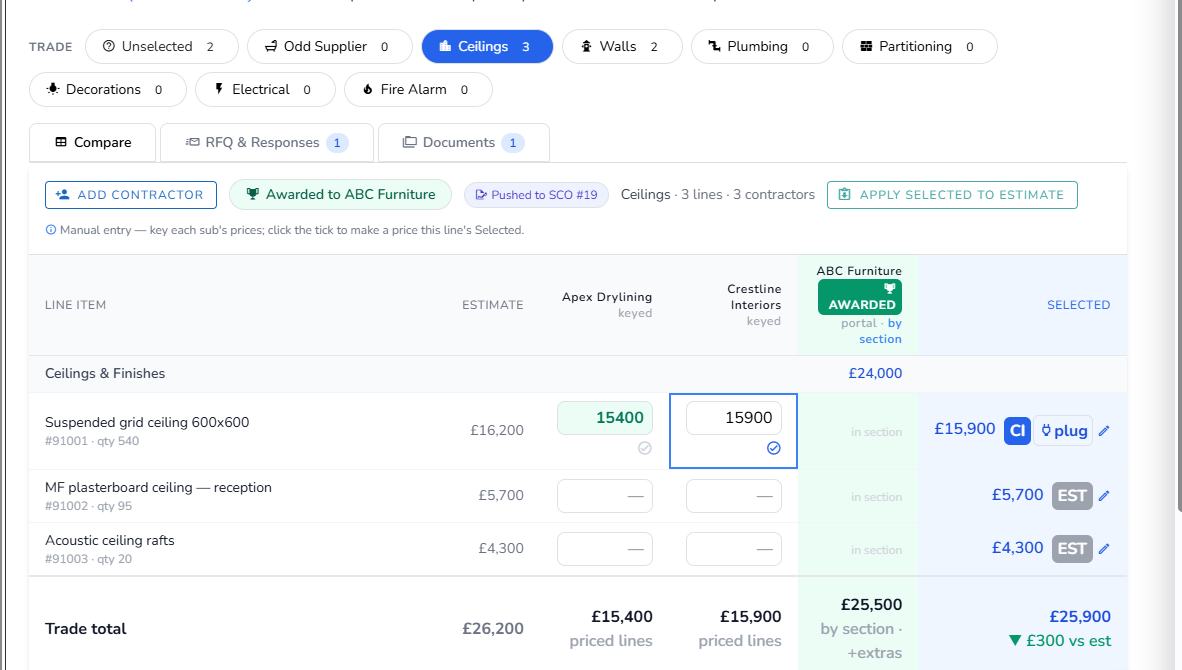
Open a board from any quote or project. Work groups into trade packages; each subcontractor's prices sit in their own column so you can read value item by item, then select the best per line. Applying selections back to the estimate is audited and undoable — the board never changes your numbers silently.
- Send portal-first RFQs and record returns
- Target rounds — send your plugged budget as per-line targets for subs to confirm or beat
- Selections held separately from the estimate
- Award a package, then push the winner to SCO and/or PO
- Apply selected prices back to the estimate — audited & undoable
Purchase Orders
Commit lines to a supplier and track committed-vs-estimated cost.
Learn more →Raise POs against project lines to commit spend to suppliers. Vyntworks tracks committed against estimated cost, and apportionment across grouped and lump-sum lines is handled for you. Every order is attributable — raised by a named person, held for approval where your tiers require it.
- Raise directly from project lines or by awarding a tender
- Committed vs estimated cost tracked per line
- Apportionment handled automatically
Subcontract Orders
Commit work to a subcontractor with its own lifecycle and emails.
Learn more →SCOs commit work to a subcontractor and move through their own lifecycle — raised through to active — with authorisation and automated notification emails. Every state change is on the record.
- Dedicated raised → active lifecycle
- Authorisation and notification emails built in
- Raised from lines or straight from an awarded tender
Document Suite
Issue a subcontract order and Vyntworks assembles the whole document pack for you.
Learn more →Built on a reference Short Form Order set, the suite bundles the order, Subcontract Conditions, drawing register, attendances, payment schedule, sum analysis, works-package and pre-start minutes — each a separate file to review, edit and send. Define your own suite types under Subcontract Tendering settings. AI is kept exactly where it belongs: only the works-package scope is AI-drafted, always human-reviewed; legal and financial documents carry no live AI at all.
- Eight documents assembled in one click, as separate files
- Conditions snapshotted from your approved terms, frozen at issue
- No live AI in legal/financial docs — only the works-package scope is AI-drafted, always reviewed
Authorisation tiers
Require approval before an order is issued — the human gate everything commits through.
Learn more →Set authorisation tiers so orders need sign-off before they're issued. The authoriser cascades from the team authoriser to the company default, so approvals always have an owner. The same gates govern AI-prepared work: drafts wait; approvals commit.
- Approval required before a PO/SCO is issued
- Authoriser cascades team → company default
- Approve / decline by email
Project file
Every order you send is filed back into the project automatically.
Learn more →Send a Short Form Order or raise a purchase order and Vyntworks files the rendered pack into the project's document register — alongside drawings and conditions, revision-aware and tagged by trade. One retrievable record per order, no manual saving — when someone asks "what did we actually send?", the answer is on file.
- Short Form Orders filed on send, head POs filed on raise
- Revision-aware — a re-issue supersedes the older copy, kept not deleted
- Filed with drawings & conditions; one record per order, no duplicates
Variations
Client, internal and subcontractor change control — each handled correctly.
Learn more →Raise a variation from a section in the project table. The three types behave differently: internal variations go for authorisation; client variations track the client's position; subcontractor variations adjust an order. Change never enters the numbers without the right approval attached.
- Internal — created pending, emailed for approval, counts once approved
- Client — tracks a pending → approved / rejected client position
- Subcontractor — requires a supplier; feeds the sub variation report
Tender → Order
Award a package and push the winner to an SCO and/or PO.
Learn more →
When you award, Vyntworks can mint one order per trade with group and lump-sum pro-rata apportionment and a balance guard. Subcontractor add-ons resolve by merging into a line or raising a variation — nothing falls between the tender and the order.
- One order per trade on award
- Group / lump-sum pro-rata apportionment
- Add-ons merge into a line or raise a variation
Snag the job — through to a signed-off handover
Delivery doesn't end when the order goes out. Walk the site, log every defect against the project with a photo or a video, hold the right subcontractor to the fix, and close it out only when everyone has signed off — all on the same job, not in a separate app.
Catch every defect on site — photo, video and all
Open the project's snag list on your phone and log what you see. Each snag carries the detail that makes it actionable, and the evidence to back it up.
- Category, zone & trade on every snag — each with its own icon, so the list reads at a glance
- Attach a photo or a video clip, captured on site — pinch to zoom in and inspect the detail
- Assign the responsible subcontractor, so the firm that owns the fix is named on the snag
- One snag register per project — saved against the job alongside everything else, not in a separate tool
Three sign-offs to a clean handover
A snag isn't done because one person says so. Each one runs through three completion stages, so a defect only closes when subcontractor, site and client all agree — sign-off gates, applied to the physical work.
- Subcontractor, internal then client sign-off — three stages tracked per snag, so nothing closes prematurely
- Give a subcontractor a scoped login — they see and update only their own snag lists, never the rest of the project
- Export to your own branded Excel template — map the columns once and the list prints with the photos embedded
- Hand the client a clear, evidenced defects list at practical completion — closed items and all
From the first defect on site to the final client sign-off — one snag register, kept with the project.
Protect the margin you quoted
Because every quote, order, variation and invoice lives in one model, the cost position is a reading, not a reconstruction — and there's a live number to check the AI's work against, and yours.
Vyntworks Intelligence — CVR
Earned value against committed and actual cost, per project.
Learn more →Cost Value Reconciliation shows earned value against committed (POs/SCOs) and actual cost. Cost pulls from your orders and matched invoices, including Xero where connected — the same audited record everything else writes to. A built-in assistant explains every column, so nobody nods along to a number they don't understand.
- Live earned-vs-committed-vs-actual on every project
- Per-section breakdown and forecast margin
- A built-in assistant explains every CVR column
Work in Progress
Company-wide earned-versus-invoiced across active projects.
Learn more →WIP rolls every active project into one company-wide view of earned value against what you've invoiced — the number your board actually wants, refreshed live from the same model as project CVR.
- Earned vs invoiced across all active projects
- Excludes archived work
- Built from the same model as project CVR
Overspend report
Every line where PO spend has exceeded budget.
Learn more →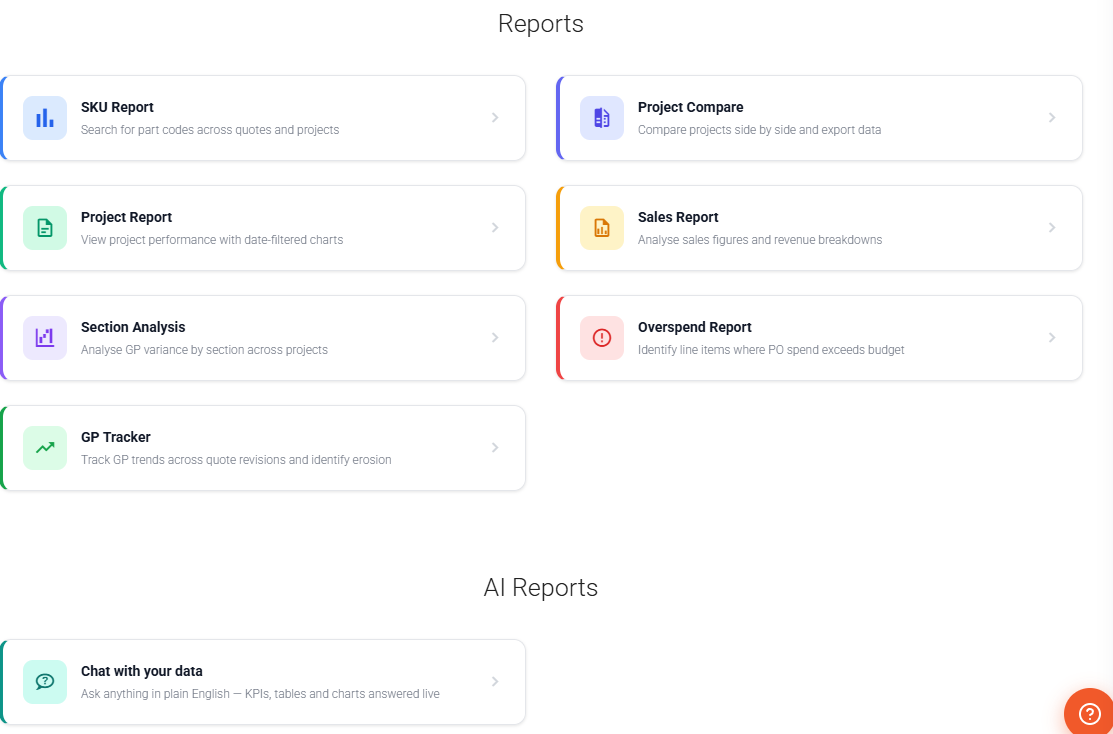
The overspend report surfaces lines where committed PO spend is over budget, expandable for per-line over/underspend, so erosion never hides until it's too late — the system raises its hand before the final account does.
- Per-line over / underspend detail
- CSV export
- FX-aware on multi-currency jobs
Invoicing & schedules
Phased billing that must total exactly 100%.
Learn more →Create invoice schedules from a schedule-type quote — fixed %, fixed £ or valuation-based — that must balance to 100%. Vyntworks drives the approvals and pushes approved invoices to Xero as drafts: nothing bills without a sign-off, and nothing leaves the record.
- Fixed % (e.g. 30-40-30), Fixed £, or Valuation-based phases
- Approval emails every Monday for invoices due in 7 days
- Quote → Scheduled → Approved → Authorised lifecycle
Valuations
Applications for payment, valued accurately per period.
Learn more →Value the work done in a period using the project's level quantities, feeding earned-versus-invoiced and keeping cashflow visible — the same figures the CVR and WIP positions read from.
- Period valuations against each project
- Uses level quantities where set
- Feeds the WIP and CVR position directly
Multi-currency
Quote, order and invoice in any currency.
Learn more →Carry a currency and FX rate on quotes, purchase orders and invoices. Override the rate per project and review rates quarterly — conversion is always project rate ÷ order rate, so there's never a surprise retro-conversion.
- Currency & FX on quotes, POs and invoices
- Per-project manual FX override
- Quarterly review, no surprise retro-conversion
Answers, not just data
These AI capabilities come with your plan — Ask Vynt on every plan, with AI Edit and the AI Report Builder from Pro. All of it runs review-first: drafts are proposed, you approve, and changes confirm before they commit. They're included, not the separately-priced Vyntworks Intelligence module (CVR & WIP).
AI Edit
Build and price estimate structures from plain English or uploaded documents — reviewed before a single line changes.
Learn more →Right-click any item or section and describe the change, or drop in a supplier PDF, spreadsheet or drawing. Vyntworks proposes colour-coded INSERT / UPDATE / DELETE operations you review and edit before applying — the AI drafts, you decide.
- Plain-English changes, one task at a time
- Import line items from PDF, Excel, Word or images
- Choose Haiku, Sonnet or Opus per task; live £ cost shown
- Apply, then undo — nothing commits without review
AI Report Builder
Describe the report you need in plain English.
Learn more →
Ask for "projects with GP below 20% in the last 6 months" and Vyntworks generates the report definition. Add parameters, set visibility and save — alongside six built-in reports. The AI writes the definition; the numbers come straight from your own record.
- Custom reports from a plain-English brief
- Private, Company or Shared visibility
- Conversational Reports → Chat with drill-downs & filter chips
Ask Vynt
An in-app assistant on every page that knows how Vyntworks works.
Learn more →Ask Vynt answers in the context of your current screen, your role and the modules you have switched on — pointing you to the exact menu, shortcut or setting. It can read your data to answer, but it always confirms before it changes anything.
- Context-aware: knows the page and your setup
- Reads your quotes, projects, invoices, suppliers and POs
- Always confirms before it changes anything
Several divisions, one system
Fit-out and M&E. North and South. Contracts and service. Most project businesses aren't one queue of work — so Vyntworks lets you group users, quotes and projects into teams, each with its own view of the pipeline and its own name on the approvals. One record underneath; the right slice of it in front of each person.
Everyone lands on their own work — and approvals find their owner
Switch Teams on and the lists you live in learn who you are. Estimators open Quotes and see their division's jobs, not everybody's. And because each team names its own authoriser, sign-off never has to be chased across the business.
- Your team's view by default — the Quotes, Projects and Tender lists open filtered to the team you belong to, with All Teams one click away when you need the wider picture
- The team travels with the work — set it on a quote and the project inherits it on conversion, so a job stays with its division from enquiry to final account
- Every team names a default authoriser — overspend and order approvals route there first and fall back to the company default, so nothing waits on an empty desk
- Managed in one place — add a team, name its authoriser, rename or drag to reorder; every edit saves as you make it, no Save button to forget
- Off until you want it — a single company-wide switch. Run as one business today, split into divisions the day you need to, without restructuring anything
Teams shape who sees what and who signs — not the record underneath. Company-wide WIP, CVR and reporting still read the same single model, so dividing the view never divides the numbers. See how order authorisation routes →
See Vyntworks on your own projects.
Book a walkthrough and we'll show you the estimate-to-final-account workflow on work that looks like yours.