AI that does real work — and answers for it.
Vyntworks puts AI inside your estimates, reports and inboxes — as named colleagues with briefs, scopes and approval limits. Read-only by default. Every write gated behind a human Approve. Every action on the record. Not risky — governed.
Review-first by design. Every proposed change is shown to a person before it touches your data — because trust is earned line by line.
Deploy AI the way you'd hire a person.
A new starter gets a job description, a manager, spending limits and a probation period. Vyntworks gives AI exactly the same treatment — so your team can use it confidently, because the control is built in, not bolted on.
Named AI colleagues
Not an anonymous chatbot — a Digital Workforce of assistants you name and brief like new hires: a job, do's & don'ts, a scoped toolset and a memory carried between conversations.
Approval limits you set
Assistants are read-only by default. Turn on “can propose actions” and anything that writes — a PO, a quote change, an email — stops and waits as an Approve / Reject card. Nothing lands until a person clicks.
A full audit trail
Every run is logged and costed in real pounds — who asked, what the AI did, who approved it and what it cost. When someone asks “where did this number come from?”, the answer is on the record.
Your method, enforced
Playbooks, import profiles and brand blocks mean the AI prices, imports and presents the way your company does — the same sections, the same cost build-up, the same brand — on every job.
One click isn't always enough. Route approvals in the right order.
A single Approve/Reject card is right for most changes. For the ones that need more, build a chain of up to four steps — the request moves down it in order, and only sends when the last person signs off.
- Role-based steps — Accounts checks the figures first, the project manager signs off next. Each step is fixed to the right people the moment the request is raised.
- Skips what's already yours — a step you're cleared to approve clears itself, so the request only ever stops where a genuine second pair of eyes is needed.
- A typed confirmation where it counts — a high-stakes step can ask the approver to tick and note why, so a sign-off is a decision, not a reflex — and every step lands on the same audit trail.
Your team is already using AI — in browser tabs, on personal accounts, unlogged and unchecked. The question isn't whether AI touches your commercial data. It's whether anyone can see it when it does.
Replace shadow AI with accountable AI.
Vyntworks doesn't introduce AI to your business — it introduces control. The same speed people are already reaching for, moved inside your approval chains, your audit trail and your spend cap.
- Inside your data, not pasted out of it — the AI works on your live quotes, projects and orders, scoped to your company, so nothing leaves for a public chat window.
- Review before apply, everywhere — from a one-line estimate tweak to a raised purchase order, changes are shown before they're committed.
- A bill you chose — every AI action is metered in £, visible to the whole team, with an optional hard monthly cap.
Where the work actually happens.
Six places AI shows up inside Vyntworks — each one review-first, each one on the same ledger.
AI Edit
Builds and prices estimate lines from plain English or an uploaded document — every change colour-coded and reviewed before it touches the quote. Detail ↓
Vyntworks Intelligence
Ask your whole business a question — quotes, projects, orders, invoices, valuations — and get live numbers back, or a branded PDF. Detail ↓
Digital Workforce
Named assistants with seats in Slack or Microsoft Teams, their own email inboxes, and a live video-call channel — acting only inside their brief. Detail ↓
Report Chat
Chat with your data in plain English — read-only — and get KPI cards, tables and charts that can become live, auto-refreshing dashboards. Detail ↓
Document Studio
Composes proposals, decks and pitch documents from your designed blocks and brand themes — never a made-up image or number. Detail ↓
Ask Vynt
Contextual help on every page — it knows your screen, your role and your modules, and it only ever answers; it never changes data. Detail ↓
Ask Vynt, AI Edit and Report Chat come with your plan; Vyntworks Intelligence — which also powers the Digital Workforce — and Document Studio are premium add-ons, included with Enterprise. All prices ex VAT. See plans & pricing →
Ask your whole business a question.
A conversational assistant that reaches across quotes, projects, purchase & subcontract orders, tenders, invoices and valuations. Ask in plain English and it pulls the live numbers — then turns the answer into a branded PDF you can send to the board.
Your numbers, in a sentence — and a board-ready PDF
No dashboards to learn. Ask the question you'd ask a commercial manager, and Vyntworks Intelligence answers from your own data — live.
- Plain-English answers spanning quotes, projects, POs & subcontract orders, tenders, invoices and valuations
- Live WIP, CVR and valuation pulled straight from your data — with an interactive panel for project or company-wide views
- Turn any answer into a branded A4 PDF — your logo and colours, page-numbered, ready to share
- Use it inside Vyntworks, or connect the same assistant to Claude — opt-in per company, your data stays scoped to your tenant
Vyntworks Intelligence reads — and, when you ask it to, acts — across your account. Changes to your data are always shown before they land.
Package a job once. Run it the same way every time.
A Playbook turns a repeatable job into a one-tap workflow for Vyntworks Intelligence — whether that's building a priced quote, composing a client document or reviewing your numbers. Each one bundles a curated set of tools, plain-English do's & don'ts and a starter prompt, so anyone on the team runs it exactly the way you intended — your method, enforced.
Build & price
Estimating playbooks that build a sectioned, priced quote — gathering the details in a guided form, or reading the spreadsheet you already use.
Compose a document
Document Studio playbooks that lay out a proposal, capability deck or tier-comparison report from your blocks and brand — same skeleton, bespoke content.
Review & report
Read-only analysis playbooks — a monthly CVR review, a single-project health check, tender shortlist prep — that walk your live data the same way every time.
Estimating playbooks — a quote from a conversation
The newest playbooks don't just read your data, they build a quote. Ask for a price and the playbook collects what it needs in a short form, then prices a clean, sectioned estimate from the rates you set.
- No attachment needed — a guided form gathers the details, then prices from your built-in rates
- Or start from the spreadsheet you already use — the playbook reads it and builds the same structured, sectioned quote
- Consistent pricing logic — your sections, cost build-up and target margin applied the same way on every job
- You review before it lands — the drafted lines come back for your approval, never written behind your back
Repeatable, governed, and easy to build
Capture the way your best estimator or commercial manager works, then let everyone run it on demand — with the guardrails you set baked in.
- Bundle the tools, do's & don'ts and a starter prompt into one named playbook your whole team can reuse
- Keep the assistant on the rails — scope it to just the playbook's tools (hard limit) or let it range wider (soft), per conversation
- Draft a playbook from a plain-English brief — AI proposes the tools, guardrails, arguments and icon for you to review and approve
- Run them in two places: the picker inside the in-app panel, or as ready-made prompts on the Claude connector
- Usage analytics show which playbooks get used and when — managed by admins under Settings
Starter playbooks ship ready to use — duplicate one, tweak the tools and guardrails, and make it yours.
On a long job, it checks in — it never runs away with it.
Vyntworks Intelligence can work a task for many minutes at a stretch — reading a tender, pricing a batch, building a report. Rather than vanish down a rabbit hole or stop silently when it runs out of road, it pauses at a natural break, sums up where it's got to, and asks you what to do next. Nothing is ever killed or capped — it only ever asks.
Three moments it stops to ask
Each checkpoint is a question, not a timeout — the work in flight is never interrupted, and you pick it straight back up in your next message.
- It pauses on a long run — after about ten minutes of continuous work it stops at a clean break, posts a short summary of progress, and offers carry on, change direction or stop. What used to be a silent halt when it reached its limit is now a question you answer
- It notices when it's stuck — and asks rather than guesses — if the same step keeps failing, it stops and says so: “I'm having trouble here — keep trying, take a different tack, skip it, or stop?” A change waiting on your approval never counts as being stuck
- Pause between items, your call — on a batch — say, eleven canopies from a single run — a playbook can check in after every few items, showing you the last result before it carries on. Set it under Settings → Playbooks
A pause is a question, never a timeout — nothing in flight is interrupted and no run is killed. Checkpoints ride the in-app assistant; scheduled Digital Workforce jobs keep their own approval leash and completion checks.
Set it once. Vyntworks watches the numbers for you.
Beyond answering on demand, Vyntworks can run on a schedule — watching your live data and telling the right people the moment something moves. Pick what to watch, how often it checks, and where the alert lands: email, Slack or Microsoft Teams.
Project GP movement
Get alerted the moment a project's overall gross profit moves — in £ and %, in either direction — since the last check. Set a threshold, or catch every move.
Line overspend digest
A periodic summary of active projects carrying overspent lines — where PO commitment has crept over the line budget — so nothing slips by unseen.
Scheduled playbook runs
Run a saved playbook on a schedule and have its report sent out. It runs read-only — it reports, it never changes your data.
Choose the cadence — and the channel
Every automation runs on its own timetable and delivers wherever your team already works. Connect a channel once; switch it on per automation.
- Schedules from every 15 minutes to hourly, daily, weekly or monthly — set per automation
- Delivered by email, Slack or Microsoft Teams — connect a channel webhook once, then toggle it on for any automation
- GP-movement and overspend alerts arrive with a sortable Excel (.xlsx) attached — ready to filter and share
- A full run history with last-run status and summary, plus a Run-now button to test any automation on the spot
- Created and governed by admins under Settings → Automations
One scheduled-task platform — with new checks and channels added over time. Automations report; they never change your data.
Work with Vyntworks from the AI you already use
Prefer to work in Claude? Add Vyntworks as a secure per-company connector and the same assistant reaches straight into your live data — quotes, projects, purchase & subcontract orders, financials and your Digital Workforce — without leaving the chat. It reads first, and any change is proposed for you to approve, exactly as it is in-app.
Your whole company, one connector
Turn it on per tenant and Vyntworks Intelligence answers from your own data inside Claude — with the same permissions, and the same guardrails, as the panel in the app.
- Opt-in per company — an admin enables the connector; every request stays scoped to your tenant with your own permissions applied
- Ask across live quotes, projects, POs & subcontract orders, tenders, invoices, WIP, CVR and valuations — the same reach as the in-app assistant
- Your saved Playbooks appear as ready-made prompts — run the same governed workflow from Claude that your team runs in-app
- Manage your Digital Workforce from chat — see the assignment board, hand out a job, nudge a worker
- Write actions are proposed, never silent — the same Approve / Reject gate, and every change shown before it lands
One connector, your whole company — turned on per tenant, governed by your admins, and always read-first.
Ask for a proposal. Get a designed, on-brand document.
A step beyond data PDFs. Document Studio composes full client-facing documents — proposals, capability decks and pitch documents — from a curated library of professionally designed page blocks and your own brand themes. Describe what you need; it lays out the pages, places your imagery and copy, turns your numbers into charts, comparisons and diagrams, and renders a polished PDF — then saves the result as a reusable document type your whole team can run again.
A brand system, not a blank page
The assistant only ever builds from your blocks, your brand and your imagery — so what you send looks designed, on-brand and unmistakably you, every time.
- Compose proposals, capability decks and pitch documents from a library of designed page blocks — each block carries a worked example the AI fills in
- Multi-brand themes — palettes, logos, fonts and page geometry. Seed one from your brand kit in a click, then every document stays on-brand
- An image & font asset library, auto-described and tagged on upload, so the assistant reaches for the right logo or photo by name
- Need a tweak? Revise a single page in place — no rebuilding the whole document — then re-render to a fresh, page-numbered PDF
- Every block is versioned and governed, with a company gallery of everything you've sent — managed under Settings → Document Studio
Already send proposals you love? Bring them in.
No blank page, no rebuild. Upload a deck or proposal you already send — a PDF, PowerPoint or Word file — and Vyntworks reads it page by page, then recreates it from your block library, in your brand.
- Import a PDF, PowerPoint or Word document — Office files convert cleanly on our side, and Vyntworks analyses every page and rebuilds it from your designed blocks and theme
- Embedded images are harvested automatically into your asset library — auto-described and tagged, no re-sourcing artwork
- Review it page by page — see a thumbnail of every page, then map it to an existing block, draft a new one, or skip. You approve exactly what goes in
- Keep the result as a reusable document type — then re-run it from a kickoff: pick the type, brand style and paper size, fill the brief
Build a document type once. Your team runs it.
Every proposal or deck you build can be saved as a reusable document type. They live together in the Studio hub — pick one, fill a short brief, and render a fresh, on-brand PDF. Nobody starts from a blank page again.
- A hub of document types — sales decks, capability statements, tier comparison reports — each a one-tap starting point
- Every type carries its own kit: the brand theme, the blocks it builds from and its featured images
- Run a type to produce a new document, or duplicate it to spin a variant for a different brand or sector
- Create a new type two ways — from a short description, or from a file you upload — then reuse it for every job
Charts, comparisons and diagrams — not just words
A proposal that wins reads like it was designed by a studio. Document Studio composes data-rich pages — turning your figures into charts, your options into a clean comparison, and your process into a diagram — every one drawn in your brand palette.
- Charts that fit the data — bar, horizontal-bar, line, area, pie, doughnut or stacked — theme-coloured, with value labels and an optional trend line
- Comparison & feature matrices — tier ladders or us-vs-them, each cell a tick, cross or value, with a highlighted recommended column
- Diagrams from a line of text — flowcharts and sequence diagrams rendered as clean vector graphics in your brand colours
- A curated icon set the assistant places inline and tints to your theme — so a page reads, not just lists
The right imagery, sourced for you — not stock-photo guesswork
A proposal lands harder when it shows the actual site. Document Studio can go and find the imagery a page needs — the real project location, the client's own brand, or clean stock — and drop each one into your asset library, tagged and ready to place.
- Capture the actual site — Google Street View and satellite / aerial imagery of the project address, straight into your assets for a “here's your site” cover
- Pull the client's own brand — scrape their logo and hero shots from their website, so the document looks made for them
- Search clean stock — Unsplash photography and Wikimedia place imagery offered as direct, on-topic candidates, not a web-search guess
- Everything lands as a tagged, reusable asset — auto-described on arrival and scoped to your company, so you can reuse it on the next job
Block Library
Designed page blocks — covers, capability grids, KPI strips — each versioned and reusable. Edit the metadata, or go deep into the HTML and slots.
Brand Themes
Multi-brand palettes, logos, fonts and page geometry. Seed a theme from your brand kit in one click and preview it live.
Asset Library
Drag-drop logos and photography — or let the assistant source site, brand and stock imagery for you. Everything's auto-described and tagged, so the right image is a name away.
Built from your blocks and your brand — never invented imagery or numbers. Curation is admin-controlled under Settings → Document Studio.
Give AI a desk in your team chat — and a brief it answers to.
A Digital Workforce assistant is a named persona you brief once — its job, its rules, its own memory and a scoped set of tools — that then lives in your Slack or Microsoft Teams channels: it answers when @mentioned, wakes itself when your numbers move, and works to a schedule you set — or takes on a whole brief and owns it over days, chasing the job to done on an assignment board you can watch. Give it its own email inbox and it works that channel too — reading, filing and replying like a colleague. And when you'd rather just talk it through, jump on a live video call and hash it out face to face.
Lives in Slack
@mention an assistant in a channel and it replies in-thread. It follows the conversation in its own channel, reads files you drop in, and can even hand off to another assistant.
Watches your data
Subscribe an assistant to the moments that matter — a quote goes live, a PO is authorised, a project's GP moves, an invoice ages — and it wakes itself to weigh in the second it happens.
Works to a schedule
Recurring or one-off, in your timezone — “every weekday at 8am”, “last Friday of the month”, “once, next Tuesday” — the assistant runs itself and posts the result.
A colleague who never misses the moment
Give an assistant a name, a one-paragraph brief and its own standing memory, then let it react to your business as it happens — in the channel where your team already talks.
- Brief it like a new hire — its job, its do's & don'ts and a scoped toolset, plus a memory it carries between conversations
- Reacts to live events — quote gone live, PO authorised, GP moved, invoice aged — read-only, with a “fire a test event” button to prove it end-to-end
- Remembers what was said — reach back through the channel's history on demand when someone says “as I mentioned last week”
- Every run is logged and costed, and read content is treated as data — never as instructions to the assistant
It learns your way of working — and you own what it remembers
An assistant doesn't start from a blank page every time. As it finishes real work it distils what it learned into a standing memory it carries into the next job — and every entry is yours to read, edit or delete. Learning on the job, kept on a leash.
- Learns from finished work, not guesswork — when an assignment wraps, the assistant proposes what it picked up; only the lessons worth keeping become memories, each stamped with the job it came from
- Every memory shows its source — and how far to trust it — a link back to the assignment that produced it, and a badge marking whether it was learned on the job, told by a person, or found on the web (the last flagged as the most cautious)
- You review the lot — a Memory tab under Settings → Digital Workforce: search it, edit a line in place, or delete anything you'd rather it didn't carry. Nothing is ever auto-pruned
- Kept to the right context — tag a memory to a client or project and it only rides jobs for that context; the rest stays general — so one client's specifics never bleed into another's work
- Promote a lesson into a Playbook — when a memory captures the way a job should always be done, distil it into a shared Playbook; the memory keeps a badge showing where it went
One shared memory for the whole workforce — curated by people
A lesson learned on one job shouldn't stay locked inside one assistant. Everything your workers bank rises into Company Memory — a single shared store every assistant recalls from, whoever saved it. It's the company's growing brain. And because AI fills it automatically, a person governs it: one review surface where you keep what belongs and prune what doesn't.
- Every worker reads the same brain — a lesson one assistant picks up on a Quayside job is there for the next assistant on the next job, so knowledge compounds across the team instead of siloing inside one persona
- Auto-banked, human-pruned — workers save freely as they work, but pruning is always a person's call. It's a soft delete: a pruned memory leaves every worker's recall at once, yet stays on the audit trail and restores in a click — nothing is lost, and nothing is ever auto-pruned
- Every memory wears its trust on its sleeve — a colour-coded origin chip marks whether it was the worker's own observation, told by a person, or found on the web (the last flagged to verify) — so you curate with the source in view
- Walled to the right context — tag a memory to a client or project and it only ever rides work for that record, so one client's specifics never bleed into another's job
- The best lessons become Playbooks — promote a memory that captures how a job should always be done into a shared Playbook; it keeps a stamp showing where it went
The shared store lives under Settings → Company Memory, part of the Digital Workforce — included in Vyntworks Intelligence →
Hand it a whole job — and watch it work
Reacting in the moment is one gear. The other is ownership: give an assistant a brief — “get the Quayside canopy priced”, “reconcile the supplier price list” — and it takes on the whole thing as an Assignment, working it across turns, days and channels until it's delivered. You follow every step on the assignment board.
- A brief it owns, not a one-off answer — each Assignment keeps a fixed brief, a living plan it ticks off, a one-page “state of play”, and an append-only journal of what it did and when
- It chases itself to done — a built-in heartbeat wakes the assistant to make the next bit of progress, so a long job keeps moving without you re-prompting at every step
- The board is your window — every worker's open jobs in one place with status, priority, progress, next action and deadline; open the detail for the plan as a checklist, the journal timeline, and every file it produced with download links
- Approve, reject or nudge right there — a channel-less worker's proposed writes surface on the board as amber “Awaiting approval” cards; approve and it runs exactly as a Slack approval would, logged with who decided. Drop it a message and it picks the job straight back up
- “Done” means delivered — a worker can only close an Assignment once the deliverable has verifiably reached the requester, not because it believes it did — so “finished” always means finished
Step into the room — watch the work stream, and steer it as it happens
The board tells you where a job is up to. The live pane puts you in the room while it happens: open a running assignment on the project page and watch the assistant's steps stream in as it works — then type a steer into the conversation and it folds your note into the job, without breaking stride.
- Watch it work, live — each step streams in as it happens, laid out as readable progress rather than a wall of text, with a deeper history you can page back through
- Or read it as a conversation — a chat view puts the back-and-forth first and folds the working steps away, so you can skim the story or open the detail step by step
- Interject without breaking stride — message the assistant mid-task and it takes your steer on its next move; nothing in flight is interrupted, the same review-first leash as everywhere else
- Hand it a file in the moment — drop a drawing or spec into the composer and it reads it into the job, gated by the same permissions that govern the rest of your account
- Every write still waits for you — steering the work never loosens the leash: a proposed PO or quote change still surfaces as an Approve / Reject card, logged with who decided
Its next moves, on the record — and yours to stand down
A colleague who takes work off your desk should never leave you guessing what happens next. Every assistant keeps an obligations ledger — sitting above its assignments, it lists everything the assistant has undertaken to do of its own accord: the chases it'll send, the replies it's waiting on, the check-ins it promised. Nothing it lines up for later is hidden from you until it fires.
- Every forward commitment, listed — each row shows what kind it is (a chase, a reply it's waiting on, a promised progress report), the job it's tied to, and its alarm: a due time, recurs if it re-arms after firing, fired N× if it's run before
- Even the unscoped ones surface — a deliberately open-ended chase, tied to no assignment, shows here with a standalone chip — so a follow-up can never sit invisible until the day it goes out
- An admin can stand any one down — Cancel takes an optional reason, ends the action for good, and journals the decision on the job, so the assistant sees a person called it off and can't quietly re-open it or chase it another way
- Close the job, clear its follow-ups — closing or cancelling an assignment cascades, standing down every obligation scoped to it automatically; the manual Cancel is there for the standalone ones and for pulling a single chase off a live job
- Everyone can read it; admins decide — the whole team can see what each assistant has promised itself, but only an administrator cancels — the same review-first leash, applied to the work it sets in motion for later
It has to prove the quote adds up — before it calls the job done
“Done” isn't the assistant's opinion. Before a Digital Workforce assistant can close a quoting assignment, the platform runs a battery of deterministic checks over the quote it built — plain code, not a second AI guess. If any come back red, the “done” is refused, the findings are logged, and the assistant has to put them right first.
- The maths has to reconcile — the measured areas are checked against the drawing's own printed figures, so a quote that comes out at twice the plan is caught, not sent
- Every priced line earns its number — a quantity with no measurement or cited source behind it is flagged, and a section-level multiplier that would quietly inflate every line under it is blocked
- Units and measurements have to line up — an area pushed into a per-metre line, or a measurement link that's broken or drifted, stops the quote until it's resolved or a reason is recorded
- The report has to match the record — the assistant's own progress notes are checked against your data, so “finished” can never run ahead of the work actually done
On Microsoft Teams? It works there too
Not everyone lives in Slack. The same assistant can take a seat in Microsoft Teams — message it in a chat and it answers from your live data, with the very same Approve / Reject safety, this time as native Adaptive Cards.
- Two-way chat, right in Teams — message the assistant and it replies in-thread from live Vyntworks data, keeping the running context of the conversation. Drop in a file or image and it reads it
- Claim a chat for an assistant — type
bind Avaand that conversation is hers; one bot fronts your whole workforce, and you can unbind any assistant from the Digital Workforce page - The same Approve / Reject leash — a proposed write arrives as an Adaptive Card with buttons; nothing lands until a person taps, exactly as on Slack
- Connect once, locked to you — wire it up under Settings → Digital Workforce, optionally pin it to your own Microsoft tenant so no other directory can reach the bot. The bot secret is stored encrypted
Give it its own inbox, too
Slack is where your team talks — but suppliers and clients still email. Hand an assistant a real mailbox and it works that channel like a colleague: reading every message, filing it to the right folder, and drafting the reply — while you decide who may set it working, and every send stays on a leash you set.
- A real email address of its own — Microsoft 365, Google Workspace, plain IMAP/SMTP, or a Vyntworks-managed staff subdomain with no provider to set up — wired in a five-step wizard with a live SPF/DKIM/DMARC readout
- Reads, files and tidies on its own — those moves write through to the real mailbox, so a teammate in Outlook or Gmail sees the same folders. Reading an email can never make it change your data
- Sending sits on a graduated ladder — from every send approved, to replies to known contacts flow freely, to an allowlist you set. Read-only assistants can never send at all
- And you choose who can even set it working — an inbound sender gate, per assistant: name the addresses or whole domains allowed to instruct it by email, and decide what happens to everyone else — quietly ignored, or held for an admin's approval before the assistant acts on it. A reply to a message the assistant sent first always gets through
- Safe by default — per-recipient rate limits, macro or executable attachments always held for a human, and DMARC monitoring that flags anyone spoofing the address
Or just talk it through — face to face
Sometimes it's quicker to say it out loud. Start a live video call with an assistant and you get a talking avatar that hears you through your mic, looks things up in your real Vyntworks data as you speak — even sharing its screen so you can watch — and hands you the finished document before you hang up.
- Brief it before you dial — jot an agenda and the assistant preps from it, so the opening minute is already on-topic
- Show it a plan mid-call — drag a drawing, PDF or photo onto the call and it reads it with vision, then talks you through what it sees
- It shares its screen, read-only — ask to see a quote or project and it opens the real Vyntworks page live on the call, scrolling the actual figures with you — view-only, so nothing can be changed, and the share is audited on the note
- Leave with the document in hand — “email me that quote” or “put the overspend into a board pack” and it prints the real file — quote, purchase order or Excel report — and drops it straight into the call as a download
- Live look-ups, on the record — it pulls real figures while you talk, and every tool call is audited on the meeting note; a read-only assistant stays read-only, and any change it wants becomes an Approve / Reject card
- A write-up you can trust — hang up and it saves the notes, schedules what you agreed and proposes the actions, with every past call kept in a run-log
Bring your team the assistants they need — a commercial watcher, a procurement hand, a reporting analyst — each on its own brief, in Slack or Microsoft Teams, over email and on a live call — the channels where work already happens.
Describe it. Review it. Then apply it.
Estimating at the speed of conversation — with a review gate on every change. Right-click any item or section and open AI Edit. Every proposed change is colour-coded and editable before it touches your quote.
Plain-English changes
“Populate a meeting room from this spec”, “add installation to those lines”, “drop every margin to 18%” — one instruction at a time.
Import from documents
Drag in a PDF, Excel, Word doc or image. Vyntworks extracts the line items and structure. Files are processed securely and deleted after the session.
Reviewed & reversible
INSERT, UPDATE and DELETE operations are colour-coded. Expand any one to edit buy, sell, GP% and quantity. Apply, then undo if needed.
Adds new line items, sections or sub-items where you ask.
Edits prices, quantities, margins or descriptions in place.
Removes lines — always shown before anything is committed.
Recurring supplier formats? Teach it once.
The same suppliers send the same layouts every week. An AI Import Profile saves the instructions and reference files for one of those formats — pick it from the dropdown and AI Edit already knows how to read it. No re-explaining the columns each time.
- Save a format once — the instructions and reference files for a particular supplier quote or BOM layout, kept as a named profile
- Pick it from the Profile dropdown before you send — AI Edit maps the same columns the same way, every time
- Consistent imports across the team — anyone pricing that supplier reuses the profile, so line items land structured, not guessed
- Created and governed by an admin under Settings → AI Import Profiles
Your house method, written once — applied every time
Import Profiles teach the AI a supplier's file; AI Quote Modules teach it your way of quoting. Each module is a reusable, named block of AI instructions — how you name and structure lines, your pricing and GP rules, your wording conventions — kept centrally so AI-assisted quoting follows one house method, instead of everyone re-typing the same brief.
- Write it with help, or by hand — a side AI chat drafts and refines the instructions from a plain-English brief (dictate it if you'd rather), and Suggest Improvement rewrites a module in place
- A validation gate before it's saved — every module is checked by the AI for a clean bill of health, and can't be saved until it passes, unless an admin deliberately overrides
- Versioned, never overwritten — each save cuts a new version with a one-line change summary, so you can read any past version and roll back to it without losing the history in between
- Governed and shared — modules are scoped to your company and curated by admins under Settings → AI Quote Modules, each showing a live count of how many quotes it drives
Looks things up as it works
When a job needs an external detail — a product spec to cite, a material it doesn't recognise — AI Edit searches the web mid-task, shows a “Searched the web” chip, then carries on building your operations. No setup.
A real Unit column
Where the source states a unit of measure — each, No., m, m², lm, kg, hrs — AI Edit records it into the line's dedicated Unit column instead of burying it in the description, so your quote stays clean and sortable.
Fills the fields your Word quote prints
Declare your own per-item fields — width drop fabric — and AI Edit populates them line by line as it builds, so the values your branded Word template needs are in place, not left blank for someone to key in afterwards.
Puts the right image on the line
It can set a line's image as it works — reusing a product photo, pulling one from your Document Studio assets, or copying the image already on another line — so the quote your client sees shows what they're buying, ready to print cleanly in Word and Excel.
Drop the whole tender pack. Get back a briefed, checked start.
Before a single quantity is measured, everything you were issued has to be read — the drawings, and the written specs and schedules that tell you how to read them. The Plan Room takes the lot in one intake, sorts the drawings from the documents, and reads the written documents first, because they dictate what to measure off the plans. Every finding cites the document and page it came from, and nothing lands on a quote until a person has checked it.
The written docs dictate the measure
A drawing gives you the geometry; the specification and schedules tell you what actually counts. So the Plan Room reads in that order — documents first, then the plans — and the geometry pass measures against a brief the documents have already shaped.
- The whole pack, in one intake — drawings and written documents together; the Plan Room sorts which is which, groups them by revision, and flags a superseded sheet or a possible duplicate rather than measuring it twice
- Documents read first, and cited — the spec and schedules are read before a plan is measured, and each finding is filed against the document and page it came from, never as loose prose you can't trace
- They shape the brief, they don't overwrite it — what the documents find is added to the measurement brief as flagged, provenance-stamped lines; a line a person wrote is never silently rewritten
- Then the geometry pass runs itself — once the document read is reviewed, the measure kicks off against the enriched brief; a drawings-only pack skips straight to measuring
A review bench, not two emails side by side
When the spec and the drawing don't agree — the classic “is that 8 or 6?”, “270 or 260?” — the Plan Room doesn't guess and it doesn't bury it in a thread. It raises the question with both candidates and the evidence behind each, and hands it to a person to settle.
- Disagreements become decisions — two readings side by side, each with its source, decided once and journalled with who chose and why, rather than argued twice over email
- A worklist you can clear — accept a finding, dismiss it or reopen it; every action is stamped with the person who took it, on the record
- Every line shows its working — the reading, its confidence, the flags on it and the document it cited, with the full history kept — and a one-tap re-run of just that line when a sheet changes
- The same takeoff viewer — open an intake drawing and mark it up in the exact tool you measure quotes in, so the plan is never a separate world
Pick the job back up — and it says where it stands
A tender pack rarely gets priced in one sitting, and rarely by one person. Come back to it a week later — or hand it to a colleague or an AI colleague — and the Plan Room opens on exactly where it stands: who touched it and when, what happened last, the questions still waiting on a person, and the notes left on the job. The history lives in the project, not in someone's inbox.
- Open questions come first — the moment anyone reopens the project, the unresolved clarifications are put to them in one go, and each answer is recorded verbatim against the finding it settles — so a decision is made once and kept, not asked again next week
- Who touched it, and when — a roll-up of everyone who's worked the project, first and last seen, with the last action stamped by name — so you know where it was left, not just that it moved
- What happened last — the recent activity is right there on open, and the last filed session report is flagged to read before you continue, so nobody carries on over the top of a colleague's work
- The notes on the job, in full — the assumptions, the caveats, the “watch this” surface newest-first with who wrote them, so context carries across the handover instead of walking out the door
The Plan Room feeds the measure — once it's briefed and checked, AI Takeoff reads the plans, and the same review-first gate carries all the way to the quote.
Hand it the drawings. Get back a takeoff you can check.
The hardest thing to ask AI for isn't words — it's a measurement off a construction drawing that's actually right. Vyntworks puts an AI estimator on the pack: it reads every sheet's title block and the drawing index, calibrates each page from its own printed dimensions, then measures rooms, wall runs and repeated symbols from the PDF's actual vector geometry — typed under the sheet's own legend — into a proposed takeoff. Ask it for a schedule in plain English, or run a whole measurement brief across the pack. The part that matters: it proves each figure with marked-up evidence, or it hands that one back. Nothing reaches your quote until you approve it.
Review-first, right down to the measurement
The same discipline as the rest of Vyntworks' AI — it drafts, you decide. Every page comes back scored red / amber / green so you know which sheets to look at first, and every quantity carries the evidence behind it. You approve figures you can defend, not a confident guess.
- Reads the pack, then the page — sheet numbers, declared scales and revisions first, so each element is measured once from the authoritative sheet; then every page calibrated from its own dimension strings before it measures a thing
- Grounded in the drawing's geometry — labelled rooms matched to their exact outlines, wall runs traced through openings, repeated symbols counted from the CAD data; image-only pages come back flagged approximate for a second look
- Counts confirmed, areas reconciled — a symbol's identity has to survive a majority vote across zoomed sample crops, and a measured area is cross-checked against the total printed on the sheet, so a takeoff at twice the plan is caught, not carried
- Ask for a schedule, or hand it a brief — "doors, P2 partitions, floor area" comes back as an enumerated schedule marked measured / needs a person / not shown; a written measurement brief runs across the whole pack and returns a dimension table with marked-up evidence
- When it's unsure, it asks — a figure it can't verify comes back marked for a human, best estimate attached, rather than a number you couldn't stand behind
- Approved quantities flow onto your quote lines — and stay drift-linked, so a re-measured drawing never quietly leaves your price wrong
Two ways to measure — by hand, or drafted for you and approved — and either way the decision stays with you. See takeoff in full on the platform →
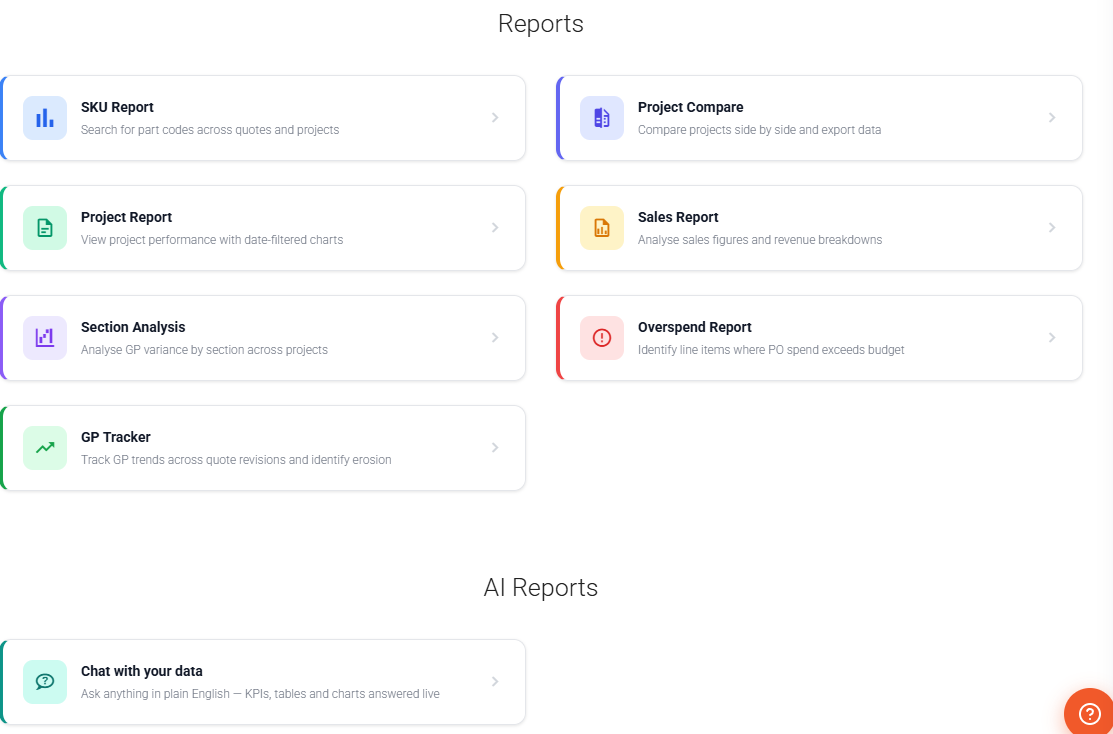
Six built-in reports — plus anything you can describe.
Any report, just by describing it
“Show me projects with GP below 20% in the last 6 months.” Vyntworks generates the report definition; you add parameters, set visibility and save.
- Six built-in reports: SKU, Project Compare, Project, Sales, Section Analysis, Overspend
- Build custom reports from a plain-English brief
- Private, Company or Shared visibility
- Plus Report Chat — ask your data anything in plain English, live (below)
Or just chat with your data
Open Report Chat and ask in plain English — “supplier spend this quarter”, “invoices overdue grouped by client”. Vyntworks reads your live data, read-only, and renders KPI cards, tables and charts on the canvas. Drill into any row, filter with a click, and keep the ones you'll run again.
- Plain-English answers, rendered live — KPI cards, tables and charts, with drill-down rows and one-click filter chips
- Presentation themes — Executive, Minimal, Print or your own Brand Kit, saved with the report so it replays the same look
- Save & pin — keep reports as Company or Private, and pin up to five as one-click favourites
- Open as a live dashboard — full-screen and auto-refreshing on a timer from one minute to once a day, with a shareable in-company link
Help that knows where you are.
A built-in assistant on every page. Tap the helper or press ? and Ask Vynt answers in the context of your current screen, your role and the modules you have switched on — grounded in how Vyntworks actually works.
On every page
A floating helper follows you across Vyntworks — or press ? from anywhere to open it, Esc to close. No hunting through a separate help site.
Knows where you are
Answers are scoped to the screen you're on, your role and the modules you've switched on — so you get the path that fits your setup, not a generic one.
Grounded in the product
Replies come from a maintained knowledge base spanning quotes, projects, POs & subcontract orders, tenders, variations, invoices, valuations and CVR.
Streamed, readable answers
Responses stream in as they're written, laid out as clear steps — not a wall of text — so you can act on the first line before the rest arrives.
Points to the exact place
Get the precise menu path, shortcut or setting to use next — then copy the whole answer to your clipboard in a single click.
A specialist inside CVR
A dedicated Ask tab lives inside the CVR, grounded in the commercial columns and WIP so it can explain the numbers in front of you.
Ask Vynt only answers questions — it never changes your data. Need to make a change? That's what AI Edit is for.
Autonomy is a policy you set — not a promise the AI makes.
Every assistant runs under an autonomy policy: what it may read, what it may propose, and what always waits for a person. The gates live in the platform — a proposed write physically stops at the approval card, whatever the model says.
Read-only by default
Every assistant starts with no write access at all. It can answer, analyse and report — and nothing else — until an admin deliberately widens its scope.
Approve / Reject cards
A proposed write posts as a card — Slack Block Kit or a Teams Adaptive Card — with the full change spelled out. Approve and it runs; reject and it doesn't. Nothing is written until a person clicks.
Enforced in the platform
Tool scopes are hard limits, approvals are atomic and run as the assistant's user, read-only assistants can never send, and read content is treated as data — never as instructions.
It can act — but only when you tap Approve
Turn on “can propose actions” and an assistant will build the change from your real data — then stop, and post it as an Approve / Reject card. The human signature is the last step on anything that commits money or reputation.
- Two clear modes — Read-only, or Can propose actions — set per assistant, with an amber badge on any that can act
- Human-in-the-loop by design — a proposed write posts as a Block Kit Approve/Reject message; the assistant never claims a change is done before you approve
- First tap wins — approvals are atomic and run as the assistant's user, and the card updates in place with the outcome — logged with who decided
- Set up and governed by admins under Settings → Digital Workforce
When the money’s bigger, so is the sign-off.
One approver is right for a £200 change — not a £40,000 one. Set thresholds in £ and the gate scales with the value at stake: a small write clears on a single tap; a large one routes to a named manager, or demands a second signature before it can be raised.
- Bands by value — approval steps up as the number does. If a value can’t be read, the action fails closed into the top band — never the loosest one
- Two-signature sign-off — a high band can require a quorum of named signatories, with must-sign approvers. The card reads “1 of 2 signatures” and the change stays parked until the last one lands
- One ladder per order — a safety interlock means every action meets exactly one ladder, so an approved change can never be double-parked or raised twice
- The same gate for people and AI — whether a person or an assistant proposes the order, it meets the identical ladder. AI never gets a shortcut around your sign-off
Know the cost — and cap it
Vyntworks meters every AI action in real pounds and shows the running total to your whole team — then lets you put a hard ceiling on the month. The AI bill becomes a number you chose, never a surprise.
- Choose speed or depth, per task — Claude Haiku for quick, low-cost tweaks, Sonnet as the everyday default, Opus for genuinely complex multi-document analysis
- Live £ per task — the model selector shows the price as you go, so there are no black-box tokens to reconcile later
- A shared AI Usage page — everyone, not just admins, sees this month's spend under Settings → AI Usage, filterable by person, surface and date
- A monthly spend cap — set a ceiling in £ for the whole company. Reach it and AI pauses gracefully across every surface — Vyntworks Intelligence, AI Edit, reports, help and the Digital Workforce — until it's raised or the month resets
- Admin-controlled — everyone watches the same gauge; only an administrator sets, raises or removes the cap
That's governed AI: named colleagues, scoped tools, human approval on every write — one signature, or several when the value demands it — a full ledger, and a bill you set in advance.
One rulebook for people and AI — see the Access Board →
You won't deploy this alone.
Governed AI is a change of working method, not just a login — so every Vyntworks plan comes with a named support partner who sets your team up, designs the first workflows with you and stays on the other end of the phone. Onboarding included, from day one.
Bring a drawing or a supplier quote to the demo — we'll turn it into priced, reviewed lines live, so you see the approval gates working on your own numbers.